Categories
Tech

GBoard Added Floating Keyboard Support In Its Final Version – Here’s How To Activate It

In September, Google announced the arrival of a new and cool function to the already renowned GBoard. The Google keyboard for Android introduced the floating keyboard. Until now, the feature was only available in GBoard Beta version, but, now, it arrives on the final release of the application.

It is quite straightforward to use the floating keyboard in GBoard. All you have to do is to follow a couple of steps on your Android phone, and after that, you will have a floating GBoard in all the applications that usually use a keyboard, including instant messaging apps, Google search, or SMS apps.

As you’ll see below, it’s straightforward to activate the floating keyboard in GBoard, which can be a useful feature for some users, although, honestly, it seems much appropriate for Android tablets users. Also, to be able to activate this function you must update the GBoard app to the latest version.

How to activate floating keyboard in GBoard app on Android devices

To begin with, you’ll need to open an app that uses the keyboard app, either an instant messaging app or Google Notes or whatever. Once the GBoar keyboard pops up, it would be displayed as regularly.

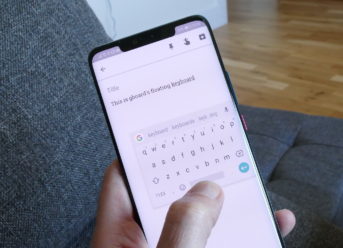
Now, to activate the floating keyboard, you must tap on the “G” icon that appears on the left side of the keyboard. After you touch it, a menu with several options should open up on the screen. Now, you have to tap on the three horizontal points that appear on the right of the screen. When you do that, at the bottom of GBoard, you’ll see several extra settings, one of which is Floating Keyboard. Thus, after you tap on it, you’ll activate the floating keyboard in GBoard.

Accordingly, in just a few simple steps, you can activate the floating keyboard in GBoard app, which is a new and cool function that might prove useful for some Android users.

Categories
Tech

iOS 12.0.1 Security Flaw Allows Anyone To Access The Photo Album Without Unlocking the Devices

Apple struggles to keep its mobile and computer operating systems as inaccessible by hackers as possible. However, while some vulnerabilities might be useful for the community, such as those that allow programmers to develop iOS jailbreak solutions, others are exposing users to privacy leaks. Now, an iOS 12.0.1 security flaw allows malevolent people, once they achieve physical access to the device, to access the photo album and send images to whoever they want via Apple Messages.

The cybersecurity company ESET, the owner of NOD32 Antivirus, among others, has warned about this failure in Apple’s operating system, which powers iPhone and iPad devices. According to ESET, everyone who takes another’s Apple device running iOS 12.0.1 can access the photo album, bypassing the secure authentication process.

According to the ESET security researcher Jose Rodriguez, the security flaw lies in the possibility of taking advantage of Siri and VoiceOver to break the authentication of an Apple device running iOS 12.0.1.

A new iOS 12.0.1 security flaw is exposing users to a significant privacy leak

The privacy vulnerability is present in all iPhone models, including iPhone XS and XS Max, as well as iPad devices that are working with the latest version of the iOS operating system, the iOS 12.0.1.

Due to this iOS 12.0.1 security flaw, an unknown, malevolent person who gains access to an Apple device will be able to skip the authentication process, be it FaceID, password, or so on, and access the photo album and send pics to whoever he/she wants. According to ESET, “Apple is aware of the existence of this bug and is expected to launch an update shortly to repair it.”

In the meantime, the cybersecurity company urges users not to leave their phone within reach of unknown persons, as the only way to exploit the iOS 12.0.1 security flaw is to have physical access to the device.

Categories
Tech

Samsung Might Implement Graphene Batteries Into Its Devices in 2019 – Galaxy Note 10 Might Be The First

Although fast charging technologies continue to improve and can now fully charge a battery within 30 minutes, there is still plenty of room for improvement. A lithium battery usually takes an hour and a half to load fully, but with graphene, that could drop to as little as 12 minutes. And Samsung plans to use graphene batteries on its devices in 2019, and Galaxy Note 10 might be the first.

Samsung would start incorporating graphene batteries in their mobiles in 2019

There is a lot of interest from the companies to start mass-producing accumulators using graphene technology, which would increase the density of batteries without increasing their size. These batteries are patented in the United States and South Korea. According to a study, graphene can increase the density of the batteries by 45%, with a charging speed up to five times faster. Besides, batteries can also withstand a higher operating temperature.

According to information coming from Weibo, the most extensive Chinese social network, Samsung has managed to complete the development of this type of batteries based on graphene, and it is expected that the South Koran tech company will start using them in their mobile phones of 2019. No information suggests that the upcoming Samsung Galaxy S10 would be the first to boast graphene batteries, so some rumors hint to Galaxy Note 10.

Samsung might incorporate fast charging based on graphene technology on Galaxy Note 10

Currently, the cost of making graphene batteries is high, but when the industry begins to migrate massively to the use of such accumulators, their production price will be substantially reduced. Samsung can do that, as it is also one of the largest battery manufacturers in the world, as well as having some of the most advanced technologies in this segment.

Be that as it may, if this happens, according to some rumors, we could see the new graphene batteries with improved and faster fast charging systems on the next year’s Samsung Galaxy Note 10.

Categories
Games Tech

Google ProjectStream Video Game Streaming Service Could “Kill” Gaming Consoles

At the beginning of the month, Google released ProjectStream closed beta for its video game streaming service that would allow users to play high-quality video games via the Chrome browser. So far, the beta version only includes one game, the new Assassin’s Creed: Odyssey.

Assassin’s Creed: Odyssey, developed by Ubisoft is a high-quality game that would require either a high-end computer or an about $400 video game console to run smoothly. However, Google ProjectStream aims to tackle these shortcomings. All you’d need is a 25 Mbps or faster internet connection.

Also, ProjectStream is not the first video game streaming service. However, the previous ones were not a big thing, and most of them sacrificed graphics quality for a smoother experience. But Google ProjectStream is not like that. According to a Business Insider report, playing Assasin’s Creed: Odyssey on ProjectStream is just like you’d play the game on a video game console.

Google ProjectStream Video Game Streaming Service Could “Kill” Gaming Consoles

As reported by Kevin Webb from the Business Insider, playing the Assassin’s Creed: Odyssey on Google ProjectStream on a poor Internet connection might cause the game to freeze or the graphics to appear pixelated from now and then. But, when playing on a fast Internet connection, Assassin’s Creed: Odyssey on Google ProjectStream runs smoothly with graphics of a quality comparable with the PS4 version of the game, for example.

Interestingly, playing high-quality games on your Google Chrome Browser via Google ProjectStream, regardless of the technical specs of your PC, might be ideal for those who can’t afford a more performant computer or a video game console. In time, as ProjectStream supports a great collection of games, increasingly more users could turn to Google’s video game streaming service.

In conclusion, Google ProjectStream video game streaming service might be the future replacement for consoles and high-end computers, allowing everyone to play high-quality games with only the Google Chrome browser and a fast Internet connection.

Categories
Tech

iOS 12.1 Developer Beta 5 Rolled Out By Apple, Along With tvOS 12.1 and watchOS 5.1 Betas

Apple commenced its fifth testing phase for its iOS 12.1, tvOS 12.1, and watchOS 5.1. Accordingly, the Cupertino-based company launched iOS 12.1 Developer Beta 5, along with the Beta versions for tvOS 12.1 and watchOS 5.1. All those developers who would want to test the new betas can either download the installation files from the Apple Download Center or as an OTA update on the Apple devices already accepted in the Beta testing program.

Also, the iOS 12.1 Public Beta 5, along with the betas for tvOS 12.1 and watchOS 5.1, would come out in a few days, most probably on Wednesday, and it would be downloadable on Apple Beta Software Program website. On the other hand, iOS 12.1 Developer Beta 5 is already available with the build number 16B5089b.

It seems that the upcoming iOS 12.1 would come out with some new features but, mostly, it would only bring some improvements of those already existing in the iOS 12 version. Also, the upcoming tvOS 12.1 and watchOS 5.1 would also come out with new changes.

iOS 12.1 Developer Beta 5 Rolled Out By Apple – What Would Be Different in iOS 12.1?

Even though iOS 12 ditched the Group FaceTime, despite being present in the betas for the current version of iOS, the function seems that it would make its comeback in iOS 12.1, according to previous beta releases. Group FaceTime would support up to 32 people in a conversation at the same time and would also boast support for Memoji.

Additionally, the upcoming iOS 12.1 would add more than 70 new Emojis and would fix the reported iPhone XS and XS Max charging issues. Also, the forthcoming version would fix some bugs and improve security.

Besides, the upcoming tvOS 12.1 version would come out with some bug fixes and security enhancements. On the other hand, the new watchOS 5.1, similarly to the iOS 12.1, would come out with support for Group FaceTime, along with some improvements and features.

Exit mobile version