Categories
News Tech

How to Install Apps when you Can’t use the Google Play Store

Whenever they want to install a cool app on their Android phone people can use the Google Play Store. This is the safest and easiest way to do it, but what happens when the application cannot be found in the store? This situation is not just hypothetical, because sometimes the app is not available in Google’s offer. Also, you might need an APK from other sources (for example, Fortnite for Android).

Sideloading can help you download almost any app which can’t be found in Google Play

Smartphone users become very frustrated when they need an app and can’t find it in the official store. This is the main reason which led to the creation of sideloading. This process is useful especially when you want to download games from the developer’s official website.

It looks like this will be the general trend in the future, because many companies have gone to allowing players to buy their games directly from the official website. In this way, you have the game right on your computer or Android device whereas, without sideloading, you couldn’t play it. To be more precise, we will mention Fortnite for Android as an example.

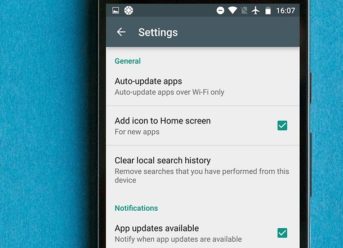
In order to perform sideloading, you will have to set up your device. In general, the settings can be found in the Security & privacy Menu or in the part dedicated to Apps. If you are using Android Oreo, you will need to do some simple operations:

  • Enter the Settings section;
  • Look for the line where it says ”install from unknown apps” or ”More”, in case the first category is not available;
  • After this step, you will reach a list of apps and you’ll have to select your browser, tap it and choose the ”Allow from this source” category.

If you are using a HTC phone or other devices, the sideloading can be performed through the following process:

  • Go to Settings;
  • Select the Apps category and then Configure Apps;
  • Scroll and find Advanced options or the Special Apps menu, then tap the button;
  • Go to the bottom of Special Apps and you’ll find the ‘install unknown apps’ option;
  • After you find your browser (for example, Chrome), select it and then tap on ”Allow from this source” button.

An easier way to get to the final result is to quit looking through the Settings and use the Search options. Here you can type in the ”Unknown” category and find what you are looking for sooner.

Once you check the ”Allow from this source” button, you’ll have the possibility to install the app files recently downloaded from your default browser. You can disable this feature after you install the APKs you want. In order to do this, you have to go back into the Settings menu.

How to download and install an APK through sideloading

So far, you’ve made an impression concerning sideloading and you know that the place from where you download the APK is very important. There are a few websites where you can get them from, but it’s best if you use an anti-virus to scan them and make sure that you don’t bring any malware to your phone.

How to sideload an app from a PC

If you happen to face any problem when you try to download an app on your Android phone, you can get it on your PC. After the download is complete, all you have to do is connect the PC and smartphone trough cable and select the Transfer Files option. Once you complete this process, the APK is copied into your phone.

Whichever option you choose, make sure that all your online operations follow safety and security policy. Always protect your device and make sure that all the apps you use are virus-free.


I’m Francis E. Hagopian, and I’m the voice and vision behind Billionaire365.com. For the last 15 years, I’ve lived and breathed Silicon Valley culture, arming myself with insights and know-how that I can’t wait to share with you. Think of me as your personal guide in the intricate maze of technology. I specialize in translating the complex into the understandable, so you can turn knowledge into power. This isn’t just about staying in the loop; it’s about giving you the tools you need to excel in a digital age. When you’re looking for reliable tech insights, know that I’ve got your back.


Categories
News Tech

WhatsApp Version in 2019 Expected With These Exciting Updates

The new version of WhatsApp has been updated recently, WhatsApp 2019 APK.

WhatsApp is a free messaging platform, available on different Android, Windows, and iOS. The app has a very strong security and privacy policy using encrypted chats. It is an online app so it needs an internet connection, and the exchange of messages is very fast.

New features were added by the developers to keep the app in trend, making the users experience better by every update. WhatsApp 2019 will include features like Android Payments and Delete Text and many more.

In 2019, WhatsApp will come with this new updates:

  • In a group chat, there is always an admin or more. Now you can remove the admin by selecting the tab ‘Group info’ followed up by clicking on ‘Dismiss as admin.’
  • The admin of a group chat has now the option to particularly choose someone from the group to change the subject, icon or the description of the group. He/she just go to the tab Group info’ and then select ‘Group setting.’
  • Any message sent can be now deleted completely from both users conversation. There is a limit time of 60 minutes. The user has to tab delete and select ‘Delete for everyone.’
  • By clicking on attach icon> location and then tap on ‘Share live location’ people can share their location in real time with any contact.
  • Now you can also edit by going into the ‘Settings’, the text and name.
  • There is a new feature in the next to the emojis, the animated GIF.
  1. WhatsApp Status

In the new update, users can now share videos, photos and GIFs in their own status as which will be shown in the Status tab. There is an automatic delete time of 24 hours.  It also works for the private inside status.

  1. Camera

The camera in WhatsApp can be now opened just by swiping to the right, from the chat window.

  1. Two Step Verification

If you want to have more privacy with the app, you can now add a passcode. Go to Settings then to Account and you will get a passcode to enter when you register with yourw number.

  1. WhatsApp Web

WhatsApp Web was made by Facebook, in order to use WhatsApp on computers or tablets. It can be accessed by scanning the QR from web.whatsapp.com with the phone and the conversations will sinc automatically.

  1. Free Messages

The WhatsApp app has always been free and it will remain like that all around the world.

  1. Multimedia Files

Images, video, audio messages and documents can be sent and received by users.

  1. WhatsApp Video/ Normal Call

This feature is great due to the fact that is happening really fast if connected at an internet source. We recommend using Wifi Connection rather than the cellular one.

  1. WhatApp Group Chats

The group limit of members is 256. In October 2016 WhatsApp Video Call feature was added to the group chats.

WhatsApp app and its updates are available on all devices that use  Android, Windows or iOS.

I’m Francis E. Hagopian, and I’m the voice and vision behind Billionaire365.com. For the last 15 years, I’ve lived and breathed Silicon Valley culture, arming myself with insights and know-how that I can’t wait to share with you. Think of me as your personal guide in the intricate maze of technology. I specialize in translating the complex into the understandable, so you can turn knowledge into power. This isn’t just about staying in the loop; it’s about giving you the tools you need to excel in a digital age. When you’re looking for reliable tech insights, know that I’ve got your back.

Categories
Tech

Shazam Update Allows Users To Share Songs Directly on Instagram Stories

In recent months, we are seeing increasingly more applications which are trying to access the functions of Instagram Stories to integrate with this feature of the social network much better. In the case of Spotify, we can already publish the songs we are listnening to as a “sticker.” It’s a form of symbiosis between both platforms. Now it’s Shazam’s turn to make the same approach, as the new Shazam update allows users to integrate the results of the Shazam songs in their Instagram Stories so that their followers can access the song.

The acquisition of Shazam by Apple was completed in September and, since then, there have been a few updates that changed the app’s main features. Shazam version 12.3 now allows sharing the content from Shazam on the Instagram Stories, the Facebook’s social network. It works similarly as Spotify permitting users to publish songs in Instagram Stories.

Next, we’ll show you how to share your Shazam songs with your Instagram Stories.

How to publish the songs from Shazam directly on Instagram Stories

  • Go to “My Shazam” and choose a song;
  • Click on the three vertical bullet points at the top right of the song cover;
  • Then click on “Share” and then on “Instagram Stories”;
  • You will be asked for permission to open Instagram and, once you’ve accepted that, you will access the Instagram Story section directly, and you’ll be able to see the image of your published Shazam song;

The concept of the new Shazam updated that allows you to post songs directly on Instagram Stories is quite simple. On the one hand, the cover of the shared song is published, and below it appears the number of captures of this song that has been made in the Shazam application. We can also store this song by clicking on “Open in Shazam” at the top left, once it is published on Instagram Stories.

Categories
Tech

WhatsApp Will Start Showing Ads Starting With Early-2019

Chris Daniels, vice president of WhatsApp, has confirmed reports announcing the early arrival of advertising to this popular instant messaging application. According to the official, status bar in WhatsApp would show ads starting with 2019.

“We’re going to put ads in the ‘status’ bar. That will be the primary monetization model for the company, as well as an opportunity for other companies to reach the people on WhatsApp,” the executive told reporters during an event in India.

Chris Daniels did not specify the date of this new arrival, deemed as an unpleasant novelty by many users, but reports indicate that it would be introduced early next year. It is not known how advertising will work within the most popular instant messaging application, in what form the ads would appear and whether they would be shown to users at random or it will be ‘targeted advertising.’

WhatsApp to show ads in the ‘status’ bar starting with 2019

The monetization of WhatsApp contradicts the intentions of the app’s founders who, in 2014, sold the WhatsApp concept to Facebook. At the end of September, one of the founders of WhatsApp, Brian Acton, explained in an interview with Forbes that he left the partnership with Facebook partly because he did not agree with Mark Zuckerberg’s plans to monetize WhatsApp.

As Brian Acton said, Facebook wanted to introduce targeted ads in the ‘status’ bar of WhatsApp, so Acton admitted he felt that the ads would break a social pact WhatsApp ‘signed’ with its users.

“Targeted advertising is something that’s not making me happy,” Acton said in an interview ack then. Another co-founder of the most popular instant messaging app, Jan Koum, also decided to leave WhatsApp last April, arguing that he also had differences with Facebook’s leadership.

In conclusion, in early-2019, WhatsApp will start showing ads (possibly targeted ads) in the application’s ‘status’ section, a movement already deemed as unpleasant by many of the app’s users.

Categories
Tech

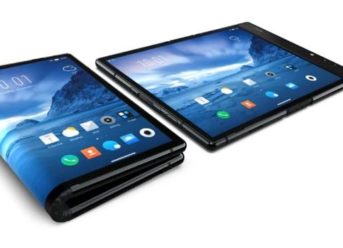
World’s First Foldable Smartphone, FlexiPai, Announced By A Chinese Tech Company

The foldable smartphones concept is now a reality. Ahead of Samsung and Huawei, who also pursue the same goal, the less-known Chinese firm Royole has presented yesterday its FlexPai folding phone, a device with a flexible screen device that can open like a book to lengthen up to 7.8 inches, a size close to the format similar to that of some low- and mid-range tablet.

That is the first foldable smartphone in the world, and will officially arrive in the North American market in December this year, marking a new achievement in the phone industry made by a Chinese company. For several years now, one of the most exciting challenges big technology brands faced has been to successfully achieve a system for folding touchscreen displays of smartphones without losing the functionality of the device.

The next step is to make the tablet format foldable so that it can be easily carried in the trouser pocket. For this purpose, this peculiar technology firm, founded by researchers at Stanford University in 2012, claims to have created a “light and flexible” screen for smartphones. That means that once folded, it has the dimensions of a “regular” mobile, but with an excessive thickness.

Chinese tech company Royole announced the first foldable smartphone in the world

When stretched, on the other hand, it becomes a tablet of about 7.6-millimeters thick and a 7.8-inches screen. According to its developers, the first foldable smartphone in the world can be folded more than 200,000 times before any damage can occur.

This FlexiPai folding phone comes before Samsung’s Galaxy X. On the other hand, Apple has also patented its own foldable screens concepts for smartphones, as well as LG, one of the largest producers of displays, and Huawei. This FlexPai, however, runs a slightly modified version of the Android operating system to be able to work in both formats.

On a technical level, the device comes with a dual-camera system of two 16 and 20 megapixels sensors, Snapdragon 855, under the hoods, and 6 GB of RAM and up to 128GB of storage. There will also be a more performant variant with 8GB of RAM with 512GB of storage.

Exit mobile version