Categories
Markets News Tech

How to Speed Up PC for Blogging

Today, we’ll be showing you a concise guide on how to speed up PC for blogging.

Blogging, unlike web development and gaming, does not require highly sophisticated system set. However, having your PC running at optimum capacity would make your work more convenient, as you’d be able to create and publish contents faster.

To achieve this, you can try some of the methods in the next section.

How to Speed Up PC for Blogging

Here are some tips for you:

  1. Upgrade Microsoft Office

For a Blogger, you’re probably familiar with Microsoft Office, particularly Microsoft Word, which is the primary tool employed for content creation; the forte of Blogging. And while the suite has evolved overtime, many users are still stuck on the old editions (2007/2003/2002/2000 and older).

Hence, to improve your performance, as a blogger, it is recommended you upgrade to a newer version of the suite, preferably Office 2019, 2016, or 2013. These new versions offer better features, which generally make your work faster and easier.

  1. Update Browsers

Most publishing platforms like Blogger, WordPress and Amazon Kindle among others require standard – updated –  web browsers. Hence, if you are running an out-of-date or unsupported browser, you may have problems.

For your convenience, below is an outline of recommended browsers for publishing on PC:

  • Firefox: v24 & above
  • Internet Explorer: v10 & above
  • Chrome: v32 & above
  1. Decongest RAM

An overloaded RAM will slow down all system activities; hence, ensure there is enough breathing space on your RAM, at all times. To achieve this, it is important to maintain as fewer running apps/processes as possible, while writing or publishing.

Simply remove nonessential processes/running apps in “Task Manager”, and leave only the essential ones (MS Word and/or publishing browser). In some cases, you may have to remove/uninstall some apps.

By decongesting RAM, you are able to protect your PC from unnecessary lags, which could hamper your writing/publishing workflow.

  1. Clean Up Disk Space

This method, like the previous one, is not specific to blogging, but rather applicable to improve the overall running speed and performance of your PC.

In the event that your storage space is clustered (filled with heavy junk apps/files), you can delete some apps and files to free up space.

With this procedure, your PC would run faster, and your blogging workflow is consequently expedited.

  1. Update Computer

This is also essential to speed up PC for blogging, as you are able to do more in less time with an up-to-date PC.

To update your PC manually (on Windows 10), follow the steps below:

  • Open Start menu: click on the ‘Windows’ icon at the top edge or bottom edge of your screen.
  • In the menu, click on Settings > Update & Security.
  • Select Windows Update > Check for updates.
  • Install available updates and follow the prompt commands to finish the installation.

In conclusion, you should be able to speed up your Windows PC by applying any of the solutions we mentioned above. Besides, any of the aforementioned solutions will boost your PC for long-lasting performance in the long run.

Have any input? Kindly drop your comments.

Categories
News Tech

How to Speed Up PC for Web Development

Looking to optimize your PC for web development? This guide is for you! Here, we’ll be showing you how to speed up PC for web development.

Web developers are often faced with the critical decision of “what type and build of computers to employ for their work”. And to a large extent, this decision determines the pace, convenience and quality of their work.

In any case, this tutorial will be showing you a set of tweaks, aimed at improving your system’s performance, to make it better suited for web development. Read on!

How to Speed Up PC for Web Development

As a web developer, you must have brainstormed and/or carried out extensive research, at one point or another, on the type of computer that is best suited for your work.

Normally, for best performance, you’d need a standard computer system, preferably a laptop to facilitate mobility and convenience. However, the term “standard” is relative, as there are different standards for different requirements.

Therefore, in this section, we’ll be showing you the recommended (standard) – system requirements – for web development.

Method 1: Check and Upgrade PC

Web development is unarguably one of the most sophisticated operations executed on computers, which involves a lot of coding – “JavaScripting”and “PHPing” among others. This requires top end system specifications for optimum performance.

Below is a roundup of the standard system requirements for web development:

  • OS: Windows 7/8/10 (64-bit)
  • CPU: Core i5
  • RAM: 8GB
  • Disk Drive: SSD (HDD is manageable)
  • GPU: GeForce RTX (NVIDIA) and/or ATI/AMD Radeon
  • And more

Going beyond the above outlined requirements is okay (or even better). However, if your PC falls short (in any aspect), you might want to upgrade as appropriate, for optimum performance.

Note: For optimum performance, Linux computers are better suited for web development than Windows PCs.

Method 2: Optimize Processor

Unlike games, whose performance centre around the GPU, web development centres around the CPU (processor). Hence, by optimizing CPU, you are able to execute heavy tasks (like web development) much faster and with better flexibility.

This procedure can be executed in a number of steps, as outlined below:

  • Open Task Manager: click Crtl + Alt + Delete.
  • Go to the Process
  • Kill all nonessential tasks/processes.
  • Go back and open the Start menu: click the ‘Windows’ icon.
  • Click on Control Panel > System and Maintenance.
  • Select Power Options.
  • Set the Power options to Balanced (setting to High performance may cause system overheating).
  • Click Change Plan Settings > Advanced Power Options.
  • Go to the Processor Power Management section, and click on it (to expand options).
  • Select Maximum processor state.
  • Click OK to apply changes
  • Exit program

This procedure would speed up your processing speed.

Closing Note

You can also adopt standard performance-enhancing tricks like: system & devices (drivers) updates, SSD trimming or HDD defragmentation and disk/storage cleanup among others.

Hope you find this helpful?

Categories
News Tech

Google Shuts Down Budget Google Pixel Slate Tablets Line

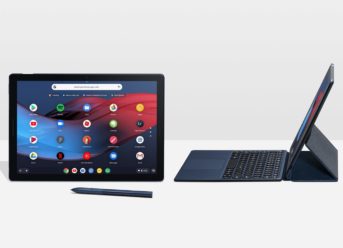
The Celeron-powered Google Pixel Slate tablets have been removed from the Google Store after being available for a limited time on the website. The two models, which have been out of stock in recent months, were exclusive to the Google Store. The delisting is a clear hint that Google decided to kill the line, a move which shouldn’t be surprising since they didn’t enjoy a good reputation.

Budget Google Pixel Slate line shut down by Google

With a price of $599 and $699, these versions of the Google Pixel Slate line offered an affordable alternative to the iPad. The more expensive versions were appreciated by a large number of reviewers and customers. However, many customers complained that the Celeron iteration offered a horrible users experience. The range is powered by Chrome OS, and the experience has been described as being laggy in the case of the Celeron versions.

The strongest advantages of the device were the build quality and hardware feature. The power button featured a built-in fingerprint sensor, allowing users to unlock their device instantly. The keyboard accessory received a large amount of praise since the smart use of magnets means that you can choose an excellent angle for the display without the need to rely on a few rigid variations.

High-end Google Pixel Slate models are still available

A high-quality 12.3-ich Molecular Display offered a great pixel density of the 293 pixels per inch. Prospective customers can choose between several performance options, with the ceiling being represented by an 8th Generation Intel i7 processor and 16 GB of RAM.

On the media side, an 8MP sensor with Full HD capability is featured on the rear while an 8MP dual camera setup delivers decent selfies. The setup includes a pair of dual front speakers, two USB-C ports, the fingerprint sensor which was mentioned before and a 48Wh battery. The most affordable version offered by Google after the cull is the 8th GEN Intel M3, with a starting price tag of $799.

Categories
Games News Tech

How to Speed Up Windows PC for Gaming

Are you an avid gamer? Do you want to improve your gaming experience on PC? Follow through this tutorial.

To enjoy optimum gaming experience today, you need a powerful PC, with standard system specifications. However, irrespective of how standard your PC is, consoles are generally better.

Nevertheless, you can give your PC a facelift to obtain an almost similar experience (to consoles), particularly in the area of improved FPS rate and near-perfect graphical display.

Want to know more? Go to the next section.

How to Speed PC for Gaming

Basically, when we talk of PC gaming, graphics cards (GPU) are practically the most essential components. And irrespective of the sophistication of the tweaks/tricks applied. there is an attainable limit, depending on the build (specs) of your PC.

In any case, below are some of the tricks you can try to speed up your PC:

  1. Update Graphics Drivers

This is highly essential, as your graphics cards determine the frame-per-second (FPS) rate of your PC. And with updated graphics drivers, you get a significant FPS boost.

Graphics drivers can easily be updated from the manufacturer’s website. However, for some reasons, many computer users do not even know which graphics card(s) is on their respective PCs. To check, simply go to: Control Panel > Hardware and Sound > Device Manager > Display adapters. The graphics cards would be displayed underneath.

Update NVIDIA drivers here, and AMD/ATI Radeon here.

  1. Disable Windows Superfetch and Prefetcher

These two features are primarily designed to improve performance on PCs. However, they tend to slow down the loading speed (and increase loading time) of high-end games and other apps. Hence, if you are a regular PC gamer, this features are better disabled.

Disable Superfetch:

  • Click on Start (Windows icon).
  • In the “Start” menu, select Control Panel.
  • Go to System and Security.
  • Select Administrative Tools
  • Click on Services.
  • Find and double click on Superfetch.
  • Select Disabled.
  • Click OK to apply changes.
  • Exit program.

Disable Prefetcher:

  • Open Registry Editor: click on “Windows + Rkeys; type in “regedit” in the pop up dialog box and click “Enter”.
  • Go to the following registry entry:
  • ‘HKEY_LOCAL_MACHINESYSTEMCurrentControlSetControlSession ManagerMemory ManagementPrefetchParameters’.
  • Locate and double click on the ‘EnablePreFetcher’ entry.
  • Set its value to ‘0’ to disable it.
  1. Defragment HDD

You can run this procedure using the “Disk Defragmenter” tool: Go to Start > All Programs > Accessories > System Tools > Disk Defragmenter. And follow the prompt commands to finish the process. This will significantly improve the loading rate of your games.

For better performance, however, you can upgrade to a Solid State Drive (SSD), which reduces the loading time of games. And to further improve performance, you can “trim” the SSD.

Other Methods

  • Free up storage space.
  • Reduce background processes/running apps.
  • Supercharge graphics cards.
  • Allocate more RAM to favorite games.
  • And more.
Categories
Crypto

Geco.one, the nexus between experience and liquidity

The Geco One platform generates synergies between the active parts of the market

A new trading platform for cryptographic assets will be launched in the coming weeks. Geco.one is aiming to be one of the complete platforms for digital trading. The competition is stiff, a technological sector that increases the benchmark continuously presenting advances every short space of time. Therefore, the trading platform presented by Geco One requires a special touch and first-rate features. A next-generation options menu will make it possible to trade inside PAMM services, futures trading, leverage, and both long and short positions from a single platform; offering control, simplicity, and diversity to the user.

In more detail, we can see that it has two types of user; Traders and Investors (traders and investors) will form part of an ecosystem of synergies that make it easier for untrained users to trade through the experience of professionals. This is a bridge between the experience of trading in markets, and liquidity waiting for sound investment advice or signal.

The platform allows you to invest safely in the cryptocurrencies and token market using the skills and knowledge of experienced traders. The innovative flagship service called PAMM trading account allows investing in pairs of cryptocurrencies or tokens by handing their resources to veteran traders and provides all the functions of the necessary tools to become a crypto trader yourself.

How does the user-side Geco.one PAMM process work?

The platform offers dual option registration. Therefore, when users register, there are two types of users:

Trader user, the 1st pillar to provide PAMM nexus. Trader account users are those who operate transparently and from whom monitored statistics are collected that reveal their success in trades and other statistics.

Investor user presents the other pillar of the users base. These are users who wish to invest in cryptocurrencies or tokens and lack the experience or time needed to study the markets and decide on trades. Users with investor account will be able to access Traders’ statistics and trade. This feature of the platform has been called PAMM.

This leads users to use Geco.one tool to analyze the failure and success history of any trader in a chosen period and a specific period. So investors keep total monitoring of the options to select and their statistics.

In short, users can choose the account of the most successful trader or with a tendency to invest in products they like; and promotes the option to fund their liquidity (the investing user) along with the trader’s trades. Also, you can always stop your investment, any time you have the will to liquidate the position.

Integration of stop-loss in the platform offering flexibility in operations

As previously reported, registered users as an investor can rely on professional traders to perform trades using their funds. This would involve a considerable counterparty risk complicated to counter without the option to trade with stop-loss. Geco.one protects users by offering integrated stop-loss.

These are orders that allow users to buy or sell when the market reaches a specified price known as ‘Stop Price.’ Such orders are traditionally used to protect profits, limit losses, or otherwise initiate new orders. A standard method is to set the Stop Loss on a moving average. In general, there is a diversity of trends and debates about the process of using Stop Loss in a trendline. This Stop Loss can also be moved following the moving average.

Consequently, users can trade using their ideas with a complete ecosystem of tools. If we add this to the monitoring and historical records of traders, the platform had to include among its options investments without time limit; and so it is, a complete ecosystem with flexibility coupled with Stop-Limit & Stop-Loss orders make Geco.one a comprehensive platform.

The third sales phase of the GEC token and two exchanges ready to roll

From the total supply of GEC tokens (250,000,000), we find that after the initial sale, an amount of 100,000,000 GEC will circulate. In the third sales phase of the token, we see data regarding the amount available for purchase, bonuses, and dates included for the period. From early July 10 (7:00 a.m. UTC) until the same time on July 14, users who purchase tokens during the third sales session will enjoy a reference bonus of 3%. For that period, the available GEC tokens are 3,000,000 for 0.00006 BTC.

Also, a few days ago, the booming exchange LATOKEN announced the listing for the upcoming dates.  The announcement began like this:

Geco.one (GEC) listed on LATOKEN soon!

Please wait for further announcements.

Source: (LATOKEN Zendesk).

During the two previous sales phases, the available quantity was also 3,000,000 per period. The Geco.one team established the following distribution parameters on which the initial event is based.

  • 80% of the supply destined for sales
  • 15% for founders
  • 3% for advisors
  • 2% for Bounty (early ecosystem rewards).

Users who want to purchase tokens during the first half of July can count on the proven services of LATOKEN (as noted above) and Coineal exchanges. From Coineal’s website it was communicated by the following statement pointing out the addition to its Launchpad:

We are excited to announce that a presale for GEC (GECOIN) will take place on Coineal Launchpad starting at 7:00 July 1 and ending on 7:00 July 14 (UTC).

Source(Coineal Web).

The adoption of new technologies is promoting the trade of crypto

Globalization has brought an unprecedented connection between parties. Borders are left behind when it comes to trading, making deals, and selling between peers. With the increasing relationships between individuals, an explosion of markets emerges hand in hand with chains of blocks. A cascade of innovation and development that provides advances and synergies not experienced before.

The era of Big Data and e-commerce has led to the need for digital currencies and tokens facilitating a vibrant and fast-growing ecosystem to be part of through the platform we have described today.

Exit mobile version