Categories
Games News

Pokemon Sword and Shield Release Date Update And News On Its Features

Did you miss the Nintendo Pokemon Direct live stream? We got you covered as we will present to you all the new information about the new Pokemon Sword and Shield. With a confirmed date release, November 15th, Nintendo showed us the new creatures and characters of the new upcoming Pokemon game.

Also, the game will feature a new “Wild Area”, a new battle mechanic named Dynamax, and Max Raid Battles. As we are used to, we will have new Pokemon characters. Gen 8 brings Wooloo, Gossifleur, and Drednaw. We will also have a game’s flying taxi, Corviknight that will allow us to visit towns and areas in the game.

Let’s take a look at the new features in Pokemon Sword and Shield

Coming as a big addition of Pokemon Sword and Shield, the Wild Area is a vast landscape between the main cities and you can explore it as much as you want. Here you will be in complete control of the camera and, at different times of the day and weather, you can spot different Pokemon.

With the Pokemon from the Galar region being able to grow in size and boost the power of their moves, the new battle mechanic called Dynamax will be available to use only once per battle so you’ll have to be very careful as the other trainers will have the same power. Not such a great thing is the Dynamax Pokemon returns to their original form after three turns, so you’ll have to use it wisely.

If you want to make a team with other trainers and kick some giant Dynamax Pokemon ass, you can use the new multiplayer component of Pokemon Sword and Shield, Max Raid battles. Remember that only one of the trainers will be able to Dynamax their Pokemon, so choose wisely if you won’t want to lose these max raid battles. The release date for the Nintendo Switch of the new Pokemon Sword and Shield is November 15th, this year, and we can’t wait for it to play!
Categories
News Tech

Google Earth 9.2.47.6 Rolled Out With New Tools, Content, And Improvements

It is likely that most internet users heard at least once about Google Earth, one of the most popular programs and apps released by Google. The software delivers an impressive and accurate representation of Earth with the help of satellite imagery. A selection of data, including satellite images, GIS data, and aerial photography is superimposed over a 3D globe, allowing users to visualize cities and landmarks from a variety of angles. Now, Google Earth 9.2.47.6 is available to download with new tools, content, and improvements.

By entering addresses and coordinates, users can explore the entire planet seamlessly, and you can jump from one city to another in a flash. There is also the option to add personalized data with the help of the Keyhole Markup Language, and it can be uploaded to various web platforms, including forums and blogs.

Google Earth Features

3D world

Google Earth can show accurate 3D building models for select regions, including high-accuracy photorealistic 3D imagery. While independent users uploaded the first 3D renders of the building, Google announced in 2012 that they would be replaced with a unified auto-generated 3D mesh. Large cities were featured, but the coverage of iconic capitals like London was delayed since more time was needed for processing. Hundreds of cities from over 40 countries can be viewed in 3D at any time.

Street View

This is one of the most popular features added to the service. Users can view a 360 degrees panoramic perspective of select cities and locations. The images were captured with the help of cameras mounted on cars. While quite impressive, they may be old in some case, and they no longer show the street as it looks in reality.

Layers

While Google Earth is open users have the option to choose between several layers which convey specific information like borders and labels, roads, oceans 3D buildings, and much more.

Google Earth 9.2.47.6 rolled out with new tools, content, and improvements

The latest update, Google Earth 9.2.47.6, comes with the ability to use a virtual ruler to calculate distances and areas across the globe. Over 100 cities were also updated with impressive 3D images.

Google Earth 9.2.47.6 is available on the Google Play Store, and you can already download the new version of the popular app.

Categories
News Tech

iPhone XR 2019 Available In Various Color Options

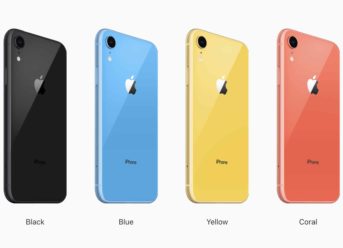
New leaks of the iPhone XR 2019 have surfaced, showing its possible color variants. When it launched, the iPhone XR of 2018 had a variation of a lot more colors, which the regular iPhone X, iPhone XS, and iPhone XS Max did not have, and it appears that the company has been preparing to keep the same tradition going, with this year’s brand new iPhone XR.

The upcoming iPhone XR is assumed to come with new color options such as black, gold, silver, and red. These color variants will differentiate the new iPhone from all the other smartphones.

These days, the majority of the upcoming smartphones are either entirely or partly leaked before the official release. For instance, the Pixel 3a and the Zenfone 6 were leaked completely before their official announcement.

The Canadian Renders have already displayed details of this year’s brand new iPhone XR which features a dual camera array on the back and a big square camera bump in which camera will be placed, as said in the leaks. There’s also a 360 degree render video depicting the huge notch and the different colors the new iPhone XR will feature.

A few users have been asking around about this year’s iPhone XR’s camera placement. The square bump on the rear side of the device will be hosting the dual cameras the iPhone XR will feature.

The iPhone XI is assumed to come with triple camera setup on the back.

A thing that concerns users and fans of the iPhone is in regard to the huge and unaesthetic notch, which seems to still come with the new iPhone. The majority of smartphone developers and manufacturers have been attempting and succeeding in ditching the notch with the Flip Cameras in the Zenfone 6, per example, it seems that the tech giant behind the popular iPhone isn’t planning to get rid of it anytime soon.

Categories
Markets News Tech

How to Speed Up Your Android Phone

Is your Android smartphone/tablet running slow? Here’s how to bypass the lag and speed up your device.

Android (powered by Google) is arguably the most widely used smartphone brand in the world, with a mammoth global userbase, which is many times larger than that of the second-placed iPhone.

However, a common issue on Android phones is the issue of device lag, which, if left to linger, could result in the eventual crash of the affected device.

Hence, if your device is running slow, you can try the methods herein to speed things up.

How to Speed Up Your Phone

A number of factors could be in play, if/when a phone is running slow. The most notorious factor, however, is a “cluttered storage or clogged up RAM”

In any case, you can follow the set of steps below to speed up your smartphone:

Method 1: Restart Phone

Before running any fix, it is pertinent to first make efforts to identify the cause of problem. However, if the cause could not be determined, you can try some fixes, starting with “device reboot”.

By restarting your device, temporary files are cleared; running processes are stopped; and minor glitches and bugs are fixed. Normally, this would get your phone running smoothly again.

Method 2: Free Up Space

If system reboot could not resolve the issue, it is possible that your storage is cluttered. Hence, you can delete some apps and files (videos, images and audio files) from your phone. This way, less resources are used and your phone should now run at a faster pace. For some essential apps that consume a lot of storage space, you can clear their respective caches.

Also, having many apps running at the same time clogs up your RAM. So, by killing off some of these tasks, you are able conserve RAM space and speed up your phone.

Note: Do NOT use third-party cleaners or task killers. They do more harm than good.

Method 3: Update Apps & OS

Outdated apps are usually filled with bugs. which impede the smooth-running of your smartphone. Hence, ensure that all installed apps are up-to-date.

Also, always install recent updates on your device. Normally, you get the notifications of available updates, to facilitate easy installation (of the updates).

These updates are basically security patches and bug fixes, designed to speed up and improve the performance of your device.

Method 4: Reset Device

As a last resort, you may have to reset your phone to “factory settings”, especially when (not if) the RAM becomes fully clogged up.

For every Android user, factory reset is a procedure you have to go through, at one point or another.

Closing Note

In some cases, especially on old Android versions (Android 5.0 and older), the ultimate solution may be to upgrade to a newer. version or simply acquire a brand new device (with an updated OS).

Hope you were able to speed up your android device by applying any of the aforementioned methods? Let us know by dropping a comment below.

Categories
Markets News Tech

Best File Sharing Apps on Android

Gone are the days when Bluetooth was the ultimate file sharing  medium on mobile platforms. Today, there are now standard file sharing apps, which offer better flexibility and faster transfer speed compared to the old (outdated) Bluetooth medium.

In this article, we’ll be bringing you a roundup of the best file sharing apps on Android. Read on!

4 Best File Sharing Apps on Android

  1. Xender

As expected by many, Xender tops our list! This file sharing app is a game changer, and it stands out as the most widely used file sharing app out there.

The app is cross compatible with notable operating platforms (mobile and desktop), including Windows, Mac, Android and iOS. And it supports cross platform transfers between these platforms.

Xender is, however, best known for its speed; running up to 200 times the speed of a standard Bluetooth. This makes it the ideal option for transferring huge files, as the whole transfer process is completed within seconds or minutes.

Xender is available for free download on Play Store (for Android users).

  1. Flash Share

Flash Share is widely regarded as the number one alternative to Xender. And it shares similar transfer speed and UI with the app. With this, it comfortably stands out as one of the best file sharing apps for Android.

Like Xender, Flash Share uses Wi-Fi/Hotspot to establish connection between devices. And its transfer speed is more or less the same as that Xender.

However, unlike Xender, Flash Share is not available on Play Store; hence, its installation may be a little tricky. Nevertheless, you can easily get its APK file from any Android APK download site.

  1. ShareIt

ShareIt is another popular file sharing app for Android. And it offers similar transfer speed to those of Xender and Flash Share. The app is commonly tagged “Lenovo mobile transfer application”, and it is best deployed on Lenovo-branded Android devices.

ShareIt is renowned for its “cloning” ability, as it can easily clone the apps and media on a connected device.

You can download ShareIt for free from Play Store.

  1. MyAppSharer

MyAppSharer rounds up our list of best file sharing apps on Android. This app uses Wi-Fi/Hotspot to establish connection between devices, to facilitate file transfer at improved speed. And it is best deployed for sharing apps.

MyAppSharer can be downloaded for free from Play Store.

Hope you were able to make a suitable choice in selecting the best file sharing app for your android device? Let us know your preferred pick by commenting below.

Exit mobile version