Many people love to watch videos on online streaming services. However, there are moments when you would like to view your favorite content, but you are unable to do so because you cannot connect to the internet. There may be a variety of reasons for this, including the lack of Wi-Fi networks in a particular area, bad signal coverage, or a limited data plan. Vidmate is the best app to download online videos and watch them while offline. Now Vidmate 4.1404 rolled out with several improvements.
Vidmate, a third-party app which allows you to download everything you want with just a few taps, is one of the most popular online video downloader apps in the world. Here are only a few of the features provided by the app.
Vidmate features
View anything offline – Downloading your content is quite easy. The app is also compatible with other sites like DailyMotion, Vimeo, and many more. Users have the option to download full movies on their device, and there is no limitation or content tap.
Dedicated music library – Over 500,000 high-quality songs await listeners, and new ones are being added each day.
Watch what is worth – A dedicated recommended content tab will suggest new content each day. Find funny clips, formidable challenges, sports highlights, and much more.
Download without issues – A robust download protocol allows users to download several videos at the same. You can also pause and resume a download, do something else while the content is being downloaded in the background and enjoy excellent speed.
Continuously updated – In recent months, the developers of the app pushed a more significant number of updates which aim to improve the user experience and make the popular app even better.
Vidmate 4.1404 came out with fixes and improvements
The latest update, Vidmate 4.1404, comes with new bug fixes, removing some issues that were quite resilient in the past versions. No new features were added, but future updates could introduce some.
Also, Vidmate 4.1404 comes with several improvements for stability and performance. Since it’s violating Google Play Store policies, Vidmate 4.1404 is only available as an APK file.
If you are one of the users that are using Showbox, maybe you know that the media streaming app has stopped working, and others are speculating that the app can be shut down. But the problem still, and the app is not working, so what can we do now? We have made a list of the best alternative for, and you can watch movies, TV shows on your Android devices, iPhone, Mac, or Windows.
Megabox HD
The app is available only for Android devices, and it streams HD content, and you have the option to choose between 360p and 720p. You can download and install Megabox just like Showbox, don’t forget to download to APK too.
Playbox HD
Playbox HD is for Android and iOS, and it has a similar interface like Showbox. You will have simple categories, menus, and navigation. You can download it because it’s free to use it, and the content is HD.
Sky HD
Having Sky HD is one of the best apps on the market, but unfortunately, it’s not for free. The app is exciting because of the picture quality and unlimited access to TV show or movies. Also, you can organize the content based on the category or genre depending on your wishes, and you can download Sky HD APK for your device.
Popcorn Time
In 2015 Popcorn Time was shut down but now is available for Windows, Android, macOS, Linux, and Android. Using Popcorn Time, you can customize everything as you wish and you will have HD movies and TV shows.
Crackle
Crackle is made by Sony and is available only for Android. You can watch TV shows and movies, you can save them for viewing later, or you can create playlists too. With Crackle you have smart TV support, and new content is updated every month.
Cinemabox
Cinemabox is available on Google Play Store, so you have to download the APK file for the install. You will have movies, TV shows and support for different languages. All the content is for free, and the apps have a Kids Mode. Crackle is available for Android and iOS device, and online and offline streaming.
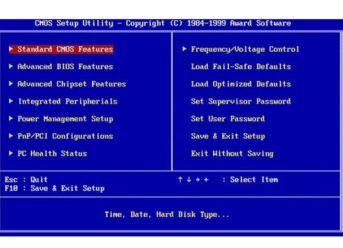
Not only professionals but also ordinary users know what the BIOS is. At least, they know that there is such thing as the BIOS and that its settings can be tweaked to optimize or speed up their PC’s certain components. Undoubtedly, you need a more exhaustive answer to the question “what is BIOS,” which, by the way, is covered thoroughly on RocketFiles.com. From our article, you’ll learn some general information about the BIOS firmware.
If you take a closer look at your motherboard, you’ll notice a small chip on it. That’s home to what we call the BIOS, which stands for the Basic Input Output System. As its very name suggests, this software helps initialize your hardware and provide runtime services for your operating system, all programs, and applications currently installed on your PC. There are plenty of reasons that may prompt you to access your BIOS. Through the BIOS, you can optimize your hardware and troubleshoot some errors your system may throw from time to time.
Since it’s the BIOS that is responsible for the POST (Power-on self-test) routines and it acts as the first software to run during the boot process.
The BIOS boasts non-volatile memory, which means that you can save its settings and retrieved the stored information when your system or standby power is off.
Note! The BIOS (Basic Input Output System) is often confused with the Basic Integrated Operating System or Built-In Operating System. Be sure to distinguish between the terms and software when dealing with the BIOS.
BIOS’ Main Functions
As we have already noted, the BIOS performs the initialization of your PC’s hardware and tests all hardware components. It’s also responsible for loading a boot loader from an MSD, which, in its turn, performs the initialization of your OS.
You may also need to access the BIOS, when it’s necessary to initialize or configure such components as memory, processor, floppy drive, optical drive, hard disk, and lots of others.
Accessing the BIOS on Your Computer
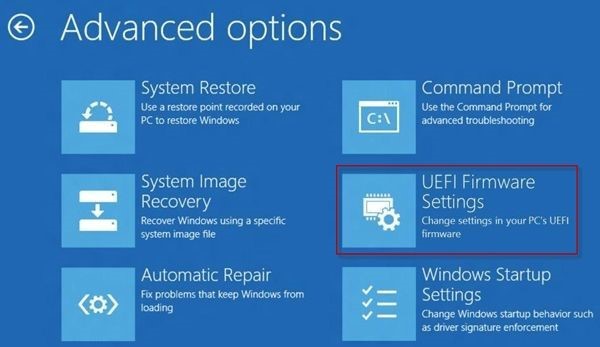
You will need to access the BIOS Setup Utility prior to incorporating any changes into your BIOS settings. In contrast to the majority of installable software, such as operating systems that come on disks or other storage devices, the BIOS is pre-installed firmware, which means that it possesses default settings and functions the way it was predetermined by a manufacturer.
BIOS Availability
You can find the BIOS on the majority of modern personal computers as part of motherboard hardware. Regardless of the Windows or Linux version you’re running on your PC, the BIOS will function independent of it.
Popular Manufacturers
Presently, there are not some many reliable and time-tested manufacturers of the BIOS firmware. Among the most popular are Phoenix Technologies, BYOSOFT, Gateway, IBM, American Megatrends, Insyde Software, Dell, and Asus.
How to Use BIOS
You already know that the BIOS allows you to configure required software through the setup utility. To do it, you need to access the BIOS, save the new changes, and reboot your machine. When you computer loads, the changes will come into effect and your BIOS will start instructing the hardware differently.
Other things you can do in most BIOS systems include:
Change the Boot Order
Load BIOS Setup Defaults
Create or change a BIOS Password
Change the Date and Time
Change Hard Drive Settings
View your Memory capacity
Enable or Disable the Quick POST
Enable or Disable the CPU Internal Cache
Enable or Disable the Caching of BIOS
Change CPU Settings
Change Memory Settings
Change System Voltages
Enable or Disable Onboard USB
Enable or Disable Onboard Audio
Enable or Disable ACPI
Change the Power Button Function
Change Power-on Settings
Change Which Display is Initialized First on Multi-Display Setups
Enable or Disable BIOS Control of System Resources
View CPU and System Temperatures
View System Voltages
How to Reset the BIOS
Experienced users sometimes resort to resetting their BIOS to restore factory settings. Resetting the BIOS settings is more of a necessary measure you may need to take if facing critical errors, problems with the entire system, or some specific hardware component.
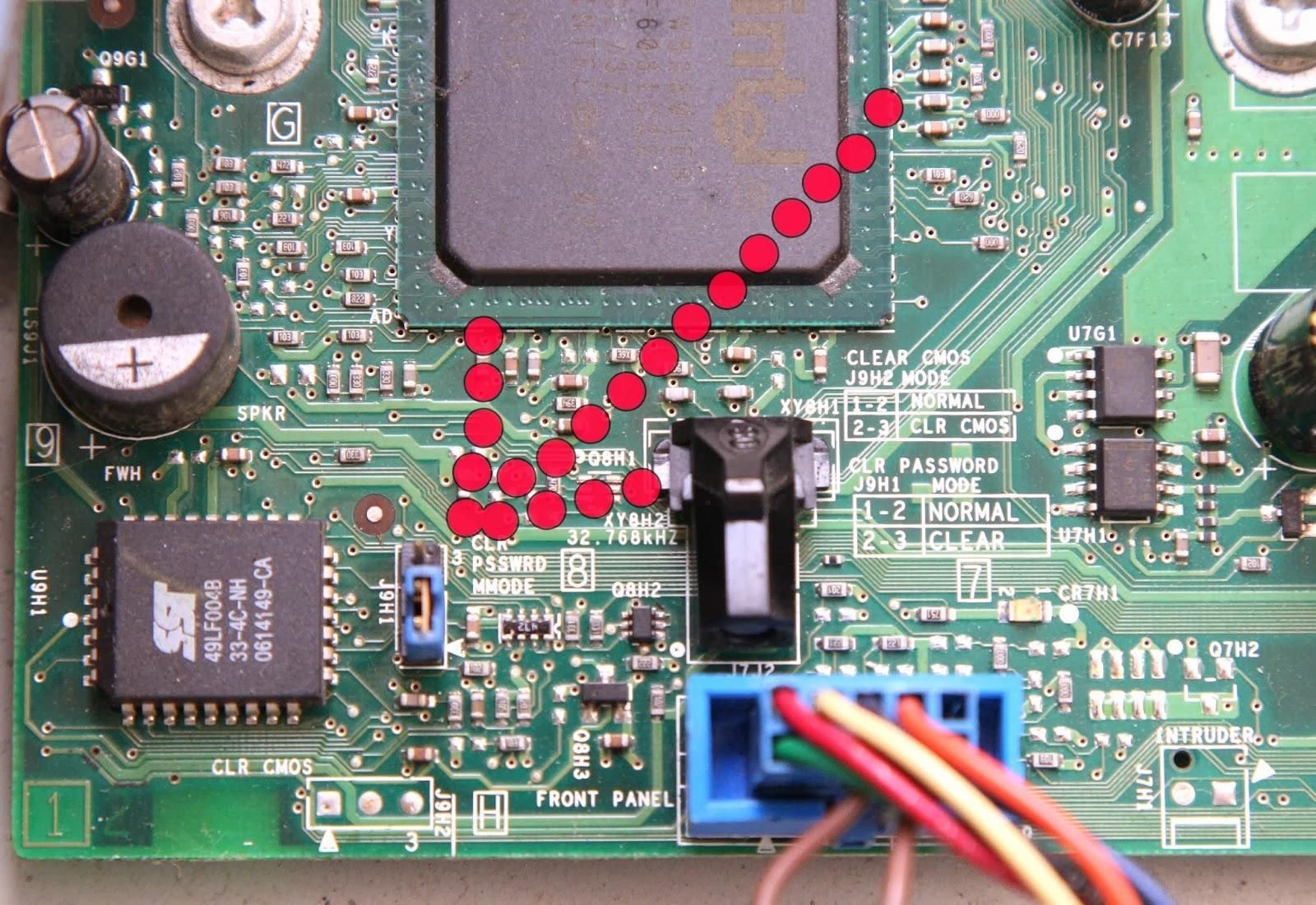
So, to reset the BIOS, you’ll need to locate the following jumpers on your motherboard:
CCMOS, Clear CMOS, or Clear RTC. Make sure that the power is off when resetting the BIOS.
Once you locate the required jumper, move it to the other two pins. For example, if the jumper is covering the first and second pins, move it so that it is covering the second and third pins.
Make sure to pull the jumper straight up to remove it. After you boot up your PC, you’ll discover the BIOS has been reset.
It’s also possible to reset your BIOS by removing the CMOS battery. To do it, unplug your PC from any power sources, open your case, and remove the CMOS battery that’s usually located next to your PCI slots. If you’re unable to locate the battery, make sure to check under expansion cards and cables. If the battery don’t remove, which is also possible, don’t use force to pull it out. Instead, opt for the jumper tweak described above.
Red Dead Redemption 2 was released to universal acclaim from critics and players less than a year ago. The game received many awards, and a stable version of Red Dead Online will be released in the following months. Now, even though it might be too early to talk about it, let’s see when Red Dead Redemption 3 might come out.
While the title was quite successful, many fans are already looking forward to the next entry series. Rockstar, which is also renowned for the famous GTA series (and other smaller titles) is known for the amount of time which is spent on working on incredible details. The studio spent eight years on the development of Red Dead Redemption 2. This means that a significant amount of time will pass until an announcement is offered on Red Dead Redemption 3.
Possible release date of Red Dead Redemption 3
In the past, Rockstar used to release one game every year. This cycle began in 1999 and lasted until 2013. Fans of the studio remember that the Red Dead series required a significant amount of development time.
Red Dead Revolver, the first title in the series, was released in 2004. Six years passed before Red Dead Redemption was released in 2010. And eight years were needed for Red Dead Redemption 2. By looking at these dates, it is easy to infer that the shortest development period will last for six years, while eight years appears to be the upper limit. The closest date that can be calculated by following this pattern is 2025.
It is essential to take into account that Rockstar Games may also opt to work on the new GTA 6 title before they begin to develop Red Dead Redemption 3.
Red Dead Redemption 3 trailer and supported platforms
Trailers are a big thing for Rockstar as the studio takes pride in the quality of the trailers which advertise their upcoming date. A Red Dead Redemption 3 trailer could surface before 2025, but that remains to be seen.
Since the PS4 and Xbox One are close to the end of their lifespan, the future Red Dead Redemption 3 game could be released for the upcoming generation of consoles. Until an official announcement is released, we can only hope that Red Dead Redemption 3 would be much better than RDR 2.
YouTube is an excellent platform, offering millions of videos which can be seen for free. In some cases, you may want to download YouTube videos for offline viewing. Users will be able to save valuable energy and data bandwidth since the videos will be accessible without an active internet connection.
Below you can find a selection of tutorials. Follow the steps, and you will have your favorite content at your fingertips in just a few minutes.
A word of advice
The use of third-party apps to download YouTube videos is deemed to be a violation of YouTube’s terms of service, as it is clearly stated that the only way to view the content is to stream it on your device by using the website or the official site.
While some creators allow users to download their content without problems, others will try to limit the practice, and you will need the express permission of the copyright owner to download it. It is advised to use a reliable VPN service to avoid any potential issues.
Download YouTube videos on PC
There are a few methods to download YouTube videos on PC, and below, you’ll find two of the most reliable ones.
4K Video Downloader
4K Video Downloader is one of the most reliable ways to download YouTube videos. The program is available for free, and users have the option to download regular videos, playlists and other types of content.
After the program is installed, you can start the process by pasting the URL of your desired content. Select your desired resolution and format and click on the download content.
YouTube Premium
Users who have a YouTube Premium subscription have the option to download videos. Open your favorite video and look for the download button which should be placed below the player. Choose a quality setting tap/click on the download button.
How to Download Videos on Android
You can download videos on Android devices by using third-party apps. If you own an Android device, you can choose from several third-party apps which can download videos from online streaming services. Apps such as Vidmate and SnapTube are available for free as APK files, but it is important to download them from a reliable source.
Also, to avoid copyright issues, you can download YouTube videos on Android, as well as on iOS, if you’re a member of the before-mentioned YouTube Premium.