Categories
Games News

The Last of Us 2 Latest Development Updates

The Last of Us 2  is an upcoming third-person action-adventure survival video game and is a sequel to 2013’s The Last of Us. It is probably one of the most anticipated games of 2019 and it is expected to be surrounded by gossips and speculations.

A Peruvian retailer, LawGamers, has released recently a promotional poster stating that the Last of Us 2 is going to be launch sometime during the month of October, this year. However, Naughty Dog, one of the most successful and prolific game development studio who is producing the game has not yet committed to a release date.

In a recent tweet, Neil Druckmann, the Vice President of Naughty dog has confirmed that the cinematic shooting of the game was finalized giving hopes of a release in the immediate future.

However, on the PlayStation website, the game is listed as a coming soon release along with Rage 2 and Days Gone. One of the Co-Directors, Anthony Newman mentioned that they are working on “close out” the work they are doing on the game. He tweeted recently that the company is looking to hire programmers, game designers and animators and this is confirming the fact that they are indeed in the final stages of development.

As in any other company, the recruiting is only the first stage before training and then get them to work on this specific project it might take few months until these new employees will start working on finalizing the game and actually “close out”. Even though it might take another year for the release, these are nevertheless good news for the fans.

To conclude, even though the cinematic shootings were done and the company is hiring staff to finalize the game it is quite unlikely that the game will be published in October 2019.

Categories
News Tech

Adobe XD Releases New Design Systems and Game Design Features to Expand Workflows

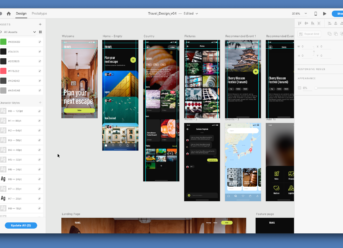
With ongoing developments in the rapidly expanding experience design space, there are increasing expectations for the apps and digital tools we use every day – and the bar for good UX only continues to increase, putting more pressure on designers and developers to deliver stellar experiences. Today, Adobe XD released new features that help deliver on these expectations, by introducing the ability to create and maintain design systems. This new design systems support will enable UX designers to easily share brand assets and re-usable design elements in order to achieve consistency and efficiency across their organizations.

Whether at an agency, a startup or a large company, implementing a design system offers a solution when there’s a need to design at scale and ensure consistency across the end-user experience, making it easier to create efficient and seamless user experiences. Adobe will also soon be launching a new website focused on exploring design systems; we’ll check in with you later this month to share updates and content.

In addition, designers can now use keyboards and gamepad interactions when designing and prototyping experiences in XD. With this release users can assign keyboard triggers to simulate desktop-based experiences, as well as use connected XBox One and Playstation Dualshock controllers as inputs to simulate interaction for game console experiences. These new prototyping capabilities can help game designers develop and prototype specific parts of a game, such as a Settings menu or character selection, as well as design keyboard shortcuts for desktop apps and web apps to enable users to be more efficient.

Additional New Features in Adobe XD

  • New plugins to extend the power of XD – Momentum around XD’s plugin ecosystem continues to grow each month, with over 150 plugins now available. With an increasing number of plugins and a recently launched accelerator to inspire new offerings, XD has also updated the plugin manager, enabling users to see summaries and detailed descriptions, as well as search for plugins based on keywords.
  • Sharing prototypes and design specs – Users can now review each incoming request to review a design specs link and decide whether to grant access.
  • Artboard Guides – Guides can now be added to any artboard by dragging them out from the top or left side of the artboard, making it easy to align elements and have consistent positioning of elements across artboards.
  • New polygon tool makes it faster to create a multitude of shapes, including triangles, rhombus, pentagons and other polygons with up to 100 sides. When combined with auto-animate, the polygon tool makes it easy to morph between different shapes.
Categories
News Tech

WhatsApp Plus APK 2019, Version 7.00 Available to Download with a Sticker Maker

If you are one of the users that are chatting on the regular WhatsApp app, but you are getting bored with it, and you want something new, we have a solution for you. WhatsApp Plus is a modified version of the WhatsApp that you already know and use, but with a plus. This modified app can’t go missing from any device, even if you use Android or iPhone. For a new app with a lot of new features and changes, WhatsApp Plus APK, version 7.00 is offering you this. And starting from now you will have a sticker maker.

WhatsApp Plus APK

By using WhatsApp APK, you will enjoy a lot of features that you don’t see on the regular version. You will have Privacy measures, and options that can hide Blue Ticks can hide Online Status; the themes provided by the app can be added, used, or store directly; and a useful feature if you are talking with friends from other countries, automatically translate for text in your preferred language. The application is receiving many updates all the time, and now, version 7.00 has new improvements as well.

WhatsApp Plus APK Version 7.00

Version 7.00 has been updated the database to 2.19.17, and the following changes are made:

  • You will see a difference in the Settings Panel because it was redesign with a new UI;
  • New Launcher icons have been added;
  • New Notification icons have been added;
  • The group feature has a new option for audio and video calling;
  • Now you can replay privately in groups;
  • New languages for translations are updated: Deutschland, Spanish, Italy, Portuguese, Hindi, Indonesian, Turkish, Russian;
  • The bug that made the app crash when searching for themes is now fixed;
  • The problem with stickers download from the Google Play Store has been resolved.


To sum up, the update has the validity extended of the version to 20.06.2019. If you want to download the WhatsApp Plus Version 7.00 check online for more updates. Also, you can create your sticker by downloading the Sticker Plus Maker.

Categories
News Tech

5 Ways You Can Use Technology for Help with Your Homework

All the technology we have means we should be able to accomplish any task, right? Well, sometimes it can be overwhelming to even know where to start when you’re looking for help with your homework. We’ve asked to put together most helpful apps Alexander Bortnitsy, a project Manager who managed and directly participated in sophisticated top education solutions developed by Elinext. Below are the five easy ways you can use technology to get help with your assignments and ace your classes!

Essay Assistance Websites

Writing essays can be one of the toughest aspects of academic life. If you’re not sure where to begin, check out some essay assistance websites online. There are tons of options to get research paper help. Sites like EssayLab.com offer tons of writing tips (everything from “How to Write an Essay in MLA Format” to “How to Write an Essay Fast”) that can help you get started with your paper. If you have no idea how to proceed, you can even get help crafting your research paper to ensure that you’re knowledgeable about the topic, have correctly cited your sources, and can meet your assignment deadline. With access to these sites, you’ll never have to freak out when you get an essay assignment ever again!

Extensions for Homework Support

There are a number of extensions that you can download that can assist with homework. One great option is Read&Write for Google Chrome, which provides personalized support for everything you work on in Google Drive (including Google Docs, PDFs, ePubs, and Kes). You can improve your reading and writing skills by using text-to-speech to hear words or documents read out loud, text and picture dictionaries to help with comprehension, and speech-to-text to dictate words for writing and proofreading purposes. You can also collect highlights from text to better summarize your notes and research. The extension even removes advertisements and extra copy on your web pages so you won’t get distracted from your homework.

Note-Taking Apps

Homework can feel daunting if you don’t have an organized way to keep track of your notes. Apps like Popplet (available for iOS) allow you to put together your notes in mind-map form, so you can more clearly visualize concepts. Mind-maps can help use facts and images for a better understanding of relationships between ideas too. Other popular note-taking apps include Evernote, Microsoft OneNote, and Simplenote, all of which can help you become a more effective note-taker.

Online Research Aids

If you’re just relying on Google for answers to your homework questions, you’re probably not getting the most accurate information out there. Luckily, there are some helpful online research aids, like Infoplease, that can give you correct and insightful information. The site has tons of useful info that you can access through a video library, almanacs, dictionary, atlas, and up-to-date encyclopedias. Plus, the info the site covers has pretty much every subject – from biographies and US history to weather and economy. Head to sites like this one to help step up your homework challenge quicker.

Virtual Tutoring

If you just can’t seem to get a handle on your homework assignments, it could be time to hire a tutor. The great thing is that you don’t even have to spend time finding one! With Tutor.com, you’ll have access to experts in every field, 24/7. They can provide you with a virtual tutor no matter what subject you need help with. You do have to pay for these services, but you can select a plan that fits best with your needs and your budget. The cost will be well worth it when you see your grades start to improve!

Stop worrying about dismal grades and get help with your homework with these tech options!

Categories
News Tech

iOS 13 Won’t Support Some Older iPhone Models, Including iPhone SE

Just a few months apart from Apple’s upcoming iOS 13, a new report has been making the rounds on the internet, claiming that the company will cut support for some older iPhone models, including iPhone 5S, iPhone 6 series, and iPhone SE.

The first beta version of Apple’s upcoming operating system, iOS 13 Developer Beta 1, is due to be released in just a few weeks, at the beginning of June 2019. Apple users have a ton of hopes on the new OS as the latest update, the iOS 12, didn’t include any impressive or important features or enhancements.

What’s new in the upcoming iOS 13?

Some of the features included in the new iOS 13 are as it follows:

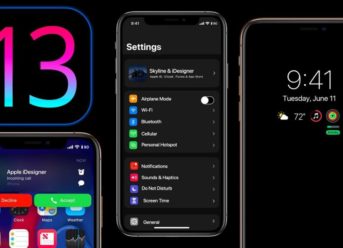
  • Dark Mode
  • Brand new Gestures
  • New File System
  • Enhances on the original mail application
  • Restore of the Home Screen

The report first appeared in a French-language website, iPhonesoft​, saying that the update support for a few of the most loved and popular iPhone models will come to an end, with the release of Apple’s upcoming iOS 13.

iOS 13 Won’t Support iPhone 5s, iPhone 6, iPhone 6 Plus, and the iPhone SE

The rumors also stated in the article on the French website, say that Apple’s iOS 13 will not be compatible with the iPhone 5s, iPhone 6, iPhone 6 Plus, and the iPhone SE. Apple’s assistance will also be dropped from iPad mini 2 and iPad Air 2013, even though these devices are incredibly able to process the new update. However, Apple doesn’t seem to think so.

These devices are among the most popular iPhones Apple has made and is still selling a lot, in particular in countries like India so cutting the update support for these smartphones will not be good news for lots of these iPhones’ users.

Also, the iPhone SE operates on the A9 chipset which also runs on iPhone 6S and iPhone 6S Plus. This implies that the most recent iOS updates might also not be compatible with the later two Apple devices.

Exit mobile version