Categories
Games News

The Developer of Pokémon Go, Niantic Is Suing Hackers

The developer of Pokémon and Harry Potter, Niantic, is going to court. The company is suing Global ++, a company which is distributing hacked versions of its games; the most known one is Pokémon Go. The Pokémon Go developer is saying that Global ++ is a group of hackers that are modifying the versions of Pokémon Go in a way that is fooling the GPS and the location data.

What Is the Story Behind?

For a while, some apps called PokeGo++ and Ingress++ are available on the market, and for the Wizards Unite is Potter++ who is still on the work. The problem with these apps is that the altered games are available for players from unsupported locations, or to the players from rural areas with little traffic. So Niantic’s games are now possible to play everywhere.

Because of that, the company is seeking an injunction to the apps, which means that they will be removed from the market. Also, the whole idea is to prevent Global ++ from taking action and reverse-engineering its code. Niantic and its efforts are going well so far because the Pokémon Go Hub is reporting that the Global ++ is shutting down rapidly. This result is positive and good for the developer of Pokémon Go, of course.

Finally, the official site of these apps, such as official Discord servers, is now offline, and they released an official statement. From the Discord servers, you can read that the company is announcing with great sadness that they will have to shut down in conformity with the legal obligations. They are adding that the ride was a fun one for the entire community, and the memories made are unbelievable. The people who had the chance to be introduced to Pokémon Go will always be close to heart, and they are happy that this change was possible.


Categories
Games News

Clash of Clans Update Practice Mode and New Village System Explained

As you know, the Sneak Peak for the update of Clash of Clans, June 2019 is over, so we are waiting with excitement for the release. The release of the June 2019 update will be rolling soon, but before that, we want to explain the new features that will come with this update. We have new details about the Practice Mode, and it is fully justified.

Clash of Clans June 2019 Update – Practice Mode

What you must know first is that Practice Mode is working as an extended tutorial with 17 levels. You can unlock the levels each time you upgrade your Town Hall. The good news is that you don’t have a timer to complete the attacks. So you can take as much time as you want. Besides this, with every level you upgrade, you will have pre-built Troops and Villages. What it’s so cool with the new update, it’s that you don’t need to bother and train your army. Why is that? Because your military will come to the pro formation, some of them, and in that way, you will also learn some pro tactics.

Also, when you start playing the tutorial for the first time, the game will give you instruction about your troops, where you should use them, and where you should position them. After that, when you will enter the second time in the game, you are free to make your own decisions and strategies. Don’t think that if you play in a Practice Mode, the rewards aren’t real. They are, and you can also keep the loot stolen and attack the village.

Besides this, the loot will be received for the first time when you play the mode, but you can attack as many times as you wish just like in the Single Player maps. Also, keep in mind that while you are making progress and upgrade the Town Hall, many new formations will be added in the Practice Mode. Take note that it’s essential to have space for training your troops.

Finally, after you complete the 17 levels, the reward will be of 5.5 million Gold and 42.000 Dark Elixir. Also, you can share the layouts with the community by copying a link of the plans. With this feature, a snapshot with your village appears, but the changes you will make will not affect the town you are sharing.

Categories
News Tech

Google Maps Comes with New Features that Notify you of Future Natural Disasters

Google has recently reported a Google Maps update, which will bring to the app even more benefits when a natural disaster occurs. Another convenient option of the app has been discovered by users as well.

The tech giant stated in a blog post that the SOS alerts feature of Google Maps was enhanced by inserting visual information when there is a natural disaster, with a brand new navigation warning system to guide users away from peril.

Besides the latter mentioned option, Google Maps users would be able to see accurate visualizations of events such as hurricanes, earthquakes, floods, with other new features.

The option called SOS alert would also offer an outline of the occurrences, together with related news, emergency numbers and websites with updates from the authorities. Google Maps users, in particular, those being close to allegedly impacted regions, may expect to receive a notification days before such an even, for instance, a hurricane will occur. Forecasts of the anticipated time and route of the storm would also be noted in the notification.

In addition, the magnitude and epicenter of the earthquake will be shown in a ‘shakemap,’ which will also be accessible from within the application. Color codes would be utilized to determine the intensity of the earthquake in specific areas as well.

Even though a feature that predicts where floods are probably prone to happen is already accessible in the app, Google plans to continue enhancing the Google Maps’ functions related to natural disaster, including an option that warn people when a road is impacted by an accident and consequently re-routes to a more secure way.

Google Maps users will also have a brand new augmented reality mode to expect. The feature, which was first unveiled at last year’s Google i/O event and at the moment undergoing testings, will use the phone’s camera to help identify precisely where users are located, rather than having to direct themselves via the tiny blue dot.

Categories
News Tech

Samsung Galaxy M40 vs. Redmi Note 7 Pro – What Would You Choose?

Samsung is one of the giant techs on the market, and this year, the company launched aggressive its smartphones in India. Some of the smartphones are the Galaxy A and Galaxy M devices for the mid-range budget segments. The analyzes are quite simple; Samsung is trying to fight with companies like Xiaomi and Realme this year. So Samsung Galaxy M40 is the perfect example of the company’s attempt to win the battle.

Samsung Galaxy M40 versus Redmi Note 7 Pro

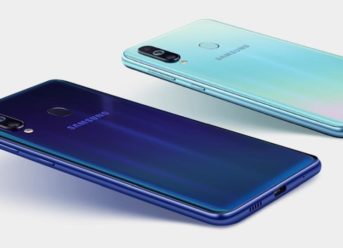
First of all, Samsung Galaxy M40 arrived in India for Rs. 19.990, and the Redmi Note 7 Pro is starting from 13.999. Looking at M40 specs, Redmi 7 Pro is the biggest competitor on the market. Going more in-depth with the analyzes, Galaxy M40 has its Infinity-O display, and it is the first phone with a hole-punch screen at this price. The screen is a larger one 6.3 inches FHD+ with minimal bezels and a high screen ratio. Even the M40 doesn’t have an AMOLED panel like the M30; it comes with an upper LCD and excellent viewing angles. The screen isn’t made of glass, but from a curved plastic and two colors on hand, Seawater Blue and Midnight Blue. However, the Redmi Note 7 Pro is coming with a Gorilla Glass 5 on both sides and 6.3 inches FHD + display. It has a water drop notch and the same display qualities as M40 from Samsung.

Second of all, we are moving to one of the most important aspects of a device, the camera. The Galaxy M40 is offering a triple camera setup with 32 MP on the primary camera, 8MP ultra-wide-angle camera, and a 5Mp depth camera. On the other hand, the Redmi Note 7 Pro comes with a 48MP Sony IMX 586 on the primary camera and a secondary camera with 5 MP depths. Unfortunately for Samsung, the Redmi Note 7 Pro wins also with the Night mode that Galaxy M40 does not have.

Moving on with the comparison, we are looking very good at the software and the battery capacity. Both the Galaxy M40 and the Redmi Note 7 Pro are running on Snapdragon 675, and the performance is similar when it comes to apps. But the difference is made by the OS, and Samsung is offering Android Pie and an improved One UI which is bringing dark mode and a redesigned interface, so it’s much better than the MIUI.

Finally, regarding the battery capacity, Samsung Galaxy M40 offers a 3.500 mAh battery, and the Redmin Note 7 Pro a 4.000 mAh battery. So the difference is essential, especially if we look at the Galaxy M30 and M20 that are sporting a 5.000 mAh. The choice is yours, of course, even if the Samsung Galaxy M40 is a right product as a standalone; the Redmi Note 7 Pro is offering a lot of cool features at a more affordable price.

Categories
News Tech

How to unjailbreak an iPhone [iOS 11]

If you’ve finally decided to unjailbreak your iPhone, you can do that with the Backup and Restore feature of iTunes.  To unjailbreak your iPhone with this method, you’ll need:

  • Your iPhone (obviously)
  • A laptop (window or mac) with the iTunes app installed.
  • A USB cable

If you already have the above, then you’re all set to begin the unjailbreaking operation. Simply follow the tips below to unjailbreak your iPhone.

Unjailbreaking iPhone using iTunes Backup and Recovery feature

Unjailbreaking your iPhone using this process will usually restore your device to its original factory stock; as such you may want to back up your files before continuing with the operation.

How to back up your files

  • Connect the iPhone to your computer
  • Select your device from the options under the play controls
  • If this is the first time of connecting your iPhone to the iTunes app, a dialog box will come up on your screen asking you to confirm the connection. Click on the YES button to continue and then input your password.
  • Scroll to the backup section in the iTunes app on your laptop and click on the Backup now button.
  • Your files will be backed up within a few minutes. Note: iTunes will not backup your firmware, as such when you restore this backup after unjailbreaking, your device will not be jailbroken.

How to unjailbreak your iPhone

  • With your iPhone still connected to your computer, Press and hold the home and power button simultaneously for at least 10 seconds
  • Hold the home button for another 5 seconds until you see connect to iTunes, once this appears, you can let go of the home button.
  • The next step is to launch the iTunes app on your laptop
  • A dialog box will come up asking if you want to the app to make changes your device, click the YES button to continue
  • Once the app finishes loading, you should see a Check for Update button and also a Restore iPhone Button.
  • Click on the Restore iPhone button
  • Your iPhone will begin the restoration process and will take several minutes to complete. Note: your IOS will also be upgraded to the latest version during the restoration.
  • This unjailbreaking process restores the phone to its default settings as such all your data and settings will be wiped clean.
  • Once your phone has been fully restored, you can follow the prompt up screen to setup your device again

How to restore your backed up files

After completing the set up, you can restore your backed up files from the iTunes app on your laptop, by connecting your iPhone to it, and launching the iTunes app.

  • Go to the backup section again and click on the restore from backup button.

This will restore your previously backed up files.

Exit mobile version