Categories
Tech

Browsec VPN – Free and Unlimited VPN 0.17 Available to Download

Privacy is crucial while you browse the Internet, and one of the best ways to keep yourself secure is to use a VPN. But why not using a Virtual Private Network that’s both free and reliable? Browsec VPN is precisely what you need to browse safely and access any content you want by bypassing geographical restrictions. Now, Browsec VPN – Free and Unlimited 0.17 version is available to download on Android.

With Browsec VPN, you will maintain your public Wi-Fi connections safe from hackers who would try to steal your private data passwords and financial information, while it would also hide your IP address. Also, with this service, you’ll boost your online privacy as it will block access of ISP to your personal information.

Browsec VPN indeed offers free and unlimited VPN services with free endpoints in the US, Netherlands, and Singapore, while the devs prepare for more to be added soon.

Browsec VPN – Free and Unlimited VPN 0.17 Available to Download

Browsec VPN comes as a free service, but it also offers a Premium variant which costs $4.99 per month or $39.99 per year (you’ll save 33% with this plan). On the other hand, Browsec VPN premium service comes with the following features:

  • Premium locations – US, Switzerland, India, Hong Kong, France, Canada, Japan, Australia, Germany, and Russia;
  • Turbo speed thanks to dedicated traffic lanes;
  • Premium servers to guarantee top performance;
  • Priority support for every subscription;

However, you can now get Browsec VPN – Free and Unlimited VPN 0.17 for Android. This new version comes with a new registration process, some other undisclosed under the hood changes, and some bug fixes.

With Browsec VPN you’ll never have to worry about your connection security and potential hacker attacks that might extract your personal and financial information. You can get the new Browsec VPN – Free and Unlimited VPN 0.17 for Android directly from the app’s official site.

Categories
Tech

SnapTube Video and Music Downloader 4.49.0.4492910 Available to Install

Many users of smartphones with Android are looking for applications to download videos at high quality and with high speed. As there are many apps to help you with that is challenging to find a good one. We previously talked about Vidmate and TubeMate, but now it’s time to present another great video and music downloader – SnapTube. Now, SnapTube Video and Music Downloader 4.49.0.4492910 is available to install.

The SnapTube app has a built-in converter that makes the download process faster. Besides, it also boasts an in-app browser and search engine for videos and music. Besides downloading videos, SnapTube Video and Music Downloader permits users to grab any song they want and convert it directly into MP3.

With SnapTube, you can straightforwardly and quickly download video clips at various resolutions, including FullHD and 4K, from popular websites such as YouTube, Facebook, Instagram, Sound Cloud, Dailymotion, and Vimeo, Metacafe, LiveLeak, Twitter, Tune, Soundcloud, Mthai, PagalWorld, and DailyTube among others.

SnapTube Video and Music Downloader 4.49.0.4492910 is available to install

Keep in mind that SnapTube Video and Music Downloader is not available in the Google Play because it’s violating Google’s terms and conditions and policies. However, you can download it as an APK file and install it on your device. Now, SnapTube Video and Music Downloader 4.49.0.4492910 is available to install.

To install SnapTube APK, first, you must go to the phone settings section and on the security tab check the installation from unknown sources option to allow your phone to install applications outside of the Google Play Store. Don’t worry, SnapTube app is safe.

The recently released SnapTube Video and Music Downloader 4.49.0.4492910 version is not bringing any visible changes. However, under the hood, the new update fixed some bugs and improved performance. This application is also available for PC with Windows 7, 8.1, or 10 and Mac OS X.

Categories
Tech

Google Drive Gets “Priority” Artificial Intelligence To Organize Documents Better

The technology we use every day is getting smarter and smarter, from mobile cameras that help take better pictures according to the scene and email apps that facilitate quick replies to document management programs like Google Drive that is now able to organize files better thanks to artificial intelligence. Google has announced the imminent arrival of a new smart tool for its Google Drive service, called Priority.

“We are adding a new page in the left navigation pane of Google Drive that helps find and manage the most appropriate Drive files at that time,” Google said on its blog.

The artificial intelligence of this new tool studies the habits of each user to determine which documents are needed at any given time and put them at the top of the list.

“Our studies show that most users only work with about 10 or 20 files at any given time,” explained Google.

Google Drive to use artificial intelligence to organize documents

Although Google Drive already prioritized the last documents that had been used, the novelty would now be in the so-called workspaces, which allow collecting a private set of files to facilitate access, without affecting their storage or permissions. The Priority artificial intelligence organizes these workspaces according to the user’s preferences in order to save the time of administration or search of a file.

However, the system also allows the user to manually design the distribution of those documents.

Additionally, besides organizing the documents, another goal of the new Google Drive artificial intelligence tool is to simplify the display of comments and some suggested actions as “you will be able to respond to some comments directly through the Drive interface and open entire documents with a single click.”

At the moment we will have to wait to see how much time this new function saves for Google Drive, as it is currently in its Beta version, so it is only available to a small group of customers who have G Suite Basic, Business and Enterprise accounts.

Categories
Games News

PlayStation Offers $10 in Free PSN Credits

Recently, Sony Interactive Entertainment launched several programs to help gamers save their money. So, after the launch of another successful Flash Sale, Sony decided to offer $10 in free PSN credits. The information emerged yesterday after many PS owners received a surprising email from the Japanese company, announcing them they received free credits to use in PlayStation Store.

If you’re wondering what’s the catch here, then you should know that there is no trick and you should not do something to get the $10 free PSN credits. However, not every PS owner will receive the free money, but Sony did not disclose how they choose who gets the bonus. Apparently, Sony uses the same scheme as in its previous giveaways.

Even though you did not get the free PSN credits yet, you still have time to get the bonus from Sony until October 5th. However, it seems that this offer is only available across the United States.

PlayStation offers $10 in free PSN credits until October 5th, while the Flash Sale ends today

As I’ve already mentioned, the $10 in free PSN credits bonus is exactly what it is – free money. You can use the credits as you want, and if you buy two or more of the selected games, you’ll get $15 instead of $10.

In other news, Sony will end its currently ongoing Flash Sales today, September 24th. Thus, today is your last chance to grab some of the selected games which include:

  • Fighting Ex Layer (Light Version) – $27.99
  • Fighting Ex Layer (Standard Version) – $41.99
  • Space Hulk: Deathwing Enhanced Edition – $23.99
  • Street Fighter 30th Anniversary Edition – $29.99
  • Tacoma – $7.99
  • Far Cry Primal: Digital Apex Edition – $16.49
  • Far Cry Primal – $14.99
  • Far Cry 3 Classic Edition – $17.99
  • MLB The Show 18 – $19.99
  • MLB The Show 18 All-Star Edition – $24.99
  • MLB The Show 18 Digital Deluxe Edition – $39.99
  • Hello Neighbor – $22.49
  • Sonic Mania Encore DLC – $3.74
  • Dark Souls Remastered – $27.99
  • Star Wars Battlefront II – $9.99
  • Earthfall – $22.49
  • Earthfall: Deluxe Edition – $29.99
  • Sega Genesis Classics – $22.49
  • Steep: Winter Games Edition – $14.99
  • Unravel Yarny Bundle – $20.99
  • Vampyr – $40.19
  • Yakuza 6: The Song of Life – $35.99
  • Adventure Times Pirates of the Enchiridion – $29.99
  • Wizards of Legend – $12.79
  • Syberia 3 – $14.99
  • Surviving Mars – $23.99
  • New Gundam Breaker – $44.99
Categories
Tech

iPhone XS and XS Max Hide A Great Secret Feature

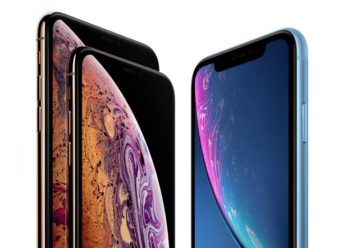
Apple’s new iPhone 2018 models, iPhone XS and XS Max, are now on sale. While many Apple fans are still waiting for the XR model, iPhone XS hides a great secret feature which might be the best reason for grabbing one of the new handsets.

According to iFixIt, both iPhone XS and XS Max hide an additional antenna that enables support for Cat 16 Gigabit LTE but which also significantly improves 4G performance. In this regard, as revealed by the popular Android and iOS signal testing app SpeedSmart, the new iPhone XS and XS Max are by 2-3 times faster on 4G than iPhone X.

That’s a great secret feature that is very useful for heavy users and also one of the reasons why you should choose an iPhone XS or XS Max over the iPhone XR model.

The great secret feature of iPhone XS and XS Max is a good enough reason to choose these models over the iPhone XR

According to SpeedSmart, both iPhone XS and XS Max show a higher speed on 4G compared with iPhone X, on three US-based mobile carriers, namely, AT&T, Verizon, and T-Mobile.

Thus, if you’re a heavy data user yourself, then you should go for one of the iPhone XS or XS Max models, and ditch the iPhone XR handset which, even though it’s appealing for its affordable price, lack this feature. iPhone XR, also, uses the same Cat 12 Gigabit LTE support precisely like the iPhone X, therefore, is slower on 4G connection.

However, besides its affordable price, iPhone XR might also attract some Apple fans thanks to its much powerful battery in comparison to both iPhone XS and XS Max.

Interestingly, iPhone XS and XS Max offer better performance on 4G while the iPhone XR model packs a much powerful battery. It makes us wonder why Apple did not come up with a model to combine all these features.

Exit mobile version